Mastering Google Ads Offline Conversion Imports: A 2026 Guide to Data Manager API

Mastering Google Ads Offline Conversion Imports: A 2026 Guide to Data Manager API
In the ever-evolving landscape of digital marketing, staying ahead of the curve is crucial. With Google Ads API undergoing significant changes in 2026, marketers need to adapt quickly. One of the most impactful updates is the modification to offline conversion imports, which will no longer accept new adopters starting June 15, 2026. This guide will walk you through everything you need to know about leveraging the Data Manager API for offline conversion imports before these changes take effect.
Understanding Offline Conversion Imports
Offline conversion imports allow businesses to track conversions that happen outside of the digital realm. This could include in-store purchases, phone orders, or any other type of conversion that doesn't occur directly on your website. By importing this data into Google Ads, you can gain a more comprehensive view of your campaign performance and make data-driven decisions.
Why Offline Conversion Tracking Matters
- Comprehensive Data: Understand the full customer journey, from online ad interaction to offline purchase.
- Improved ROI: Accurately measure the return on investment for your ad spend.
- Better Optimization: Use complete data to optimize your campaigns effectively.
The Role of Data Manager API
The Data Manager API is a powerful tool that allows you to manage and import offline conversion data into Google Ads. It provides a structured way to handle large volumes of data, ensuring that your offline conversions are accurately attributed to the correct ad interactions.
Key Features of Data Manager API
- Data Segmentation: Organize your data into different segments for better analysis.
- Automated Imports: Schedule regular data imports to keep your conversion data up-to-date.
- Data Validation: Ensure the accuracy and integrity of your imported data.
Preparing for the 2026 Changes
With the upcoming changes to Google Ads API, it's essential to prepare your offline conversion tracking strategy. Here are some steps to ensure a smooth transition:
- Audit Your Current Setup: Review your existing offline conversion tracking methods and identify any areas that need improvement.
- Familiarize Yourself with Data Manager API: If you haven't already, start using the Data Manager API to manage your offline conversion data.
- Update Your Data Collection Processes: Ensure that your data collection methods are compatible with the new API requirements.
Adapting to the 2026 changes in Google Ads API is not just about compliance; it's about leveraging new tools to gain deeper insights and drive better results.
Step-by-Step Guide to Using Data Manager API
Step 1: Set Up Your Data Manager Account
- Create a Google Ads API Account: If you don't already have one, sign up for a Google Ads API account.
- Enable Data Manager API: Navigate to the API settings and enable the Data Manager API.
- Configure Your Data Sources: Set up your data sources, including CRM systems, POS systems, and any other sources of offline conversion data.
Step 2: Prepare Your Data
- Data Cleaning: Ensure your data is clean and free of duplicates or errors.
- Data Formatting: Format your data according to the Data Manager API specifications.
- Data Segmentation: Segment your data into meaningful categories for better analysis.
Step 3: Import Your Data
- Schedule Imports: Set up a regular import schedule to keep your data up-to-date.
- Validate Data: Use the Data Manager API's validation tools to ensure the accuracy of your imported data.
- Monitor Imports: Regularly monitor your data imports to identify and resolve any issues promptly.
Advanced Tips for Maximizing Offline Conversion Tracking
Integrate with CRM Systems
Integrating your CRM system with the Data Manager API can provide a seamless flow of data, ensuring that all customer interactions are tracked and attributed correctly. This integration can help you gain deeper insights into customer behavior and improve your marketing strategies.
Use Machine Learning for Data Analysis
Leverage machine learning tools to analyze your offline conversion data. Machine learning can help you identify patterns and trends that may not be immediately apparent, providing valuable insights for optimizing your campaigns.
Implement Cross-Channel Attribution
Cross-channel attribution allows you to understand the various touchpoints a customer interacts with before making a purchase. By implementing cross-channel attribution, you can gain a more comprehensive view of the customer journey and optimize your marketing efforts accordingly.
Common Challenges and Solutions
Data Accuracy Issues
Challenge: Ensuring the accuracy of your offline conversion data can be difficult, especially when dealing with large volumes of data.
Solution: Use the Data Manager API's validation tools to clean and validate your data before importing it into Google Ads.
Data Integration Problems
Challenge: Integrating data from multiple sources can be complex and time-consuming.
Solution: Use a data integration platform to streamline the process and ensure that all your data sources are compatible with the Data Manager API.
Keeping Up with API Changes
Challenge: Staying up-to-date with the latest changes to the Google Ads API can be challenging.
Solution: Regularly review the Google Ads API documentation and participate in relevant forums and communities to stay informed about the latest updates.
Case Studies and Success Stories
Case Study 1: Retail Business
A retail business implemented the Data Manager API to track offline conversions from their in-store purchases. By integrating their POS system with the Data Manager API, they were able to gain a comprehensive view of their customer journey and optimize their ad spend accordingly. As a result, they saw a 30% increase in ROI within the first three months.
Case Study 2: Service Provider
A service provider used the Data Manager API to track offline conversions from phone inquiries and bookings. By leveraging machine learning for data analysis, they identified key trends and patterns in customer behavior, allowing them to optimize their marketing strategies and improve their overall performance.
Future Trends in Offline Conversion Tracking
Increased Use of AI and Machine Learning
The use of AI and machine learning in data analysis is expected to grow significantly in the coming years. These technologies can provide deeper insights into customer behavior and help businesses optimize their marketing strategies more effectively.
Greater Emphasis on Data Privacy
With increasing concerns about data privacy, businesses will need to ensure that their data collection and tracking methods comply with relevant regulations and best practices. This includes obtaining proper consent from customers and implementing robust data security measures.
Integration with Emerging Technologies
The integration of offline conversion tracking with emerging technologies such as augmented reality (AR) and virtual reality (VR) is expected to provide new opportunities for businesses to engage with customers and track their interactions more effectively.
Conclusion
As we approach the 2026 changes to Google Ads API, it's crucial for businesses to adapt and leverage the Data Manager API for offline conversion tracking. By following the steps and tips outlined in this guide, you can ensure a smooth transition and continue to gain valuable insights into your marketing performance.
Key Takeaways
Additional Resources
About PepperInsight.com
Pepper Insight scans 1M+ news articles daily across 40 countries, extracting qualified leads and generating personalized outreach messages with AI precision. By leveraging advanced data analysis and machine learning, PepperInsight.com helps businesses stay ahead of the curve and drive better marketing results.

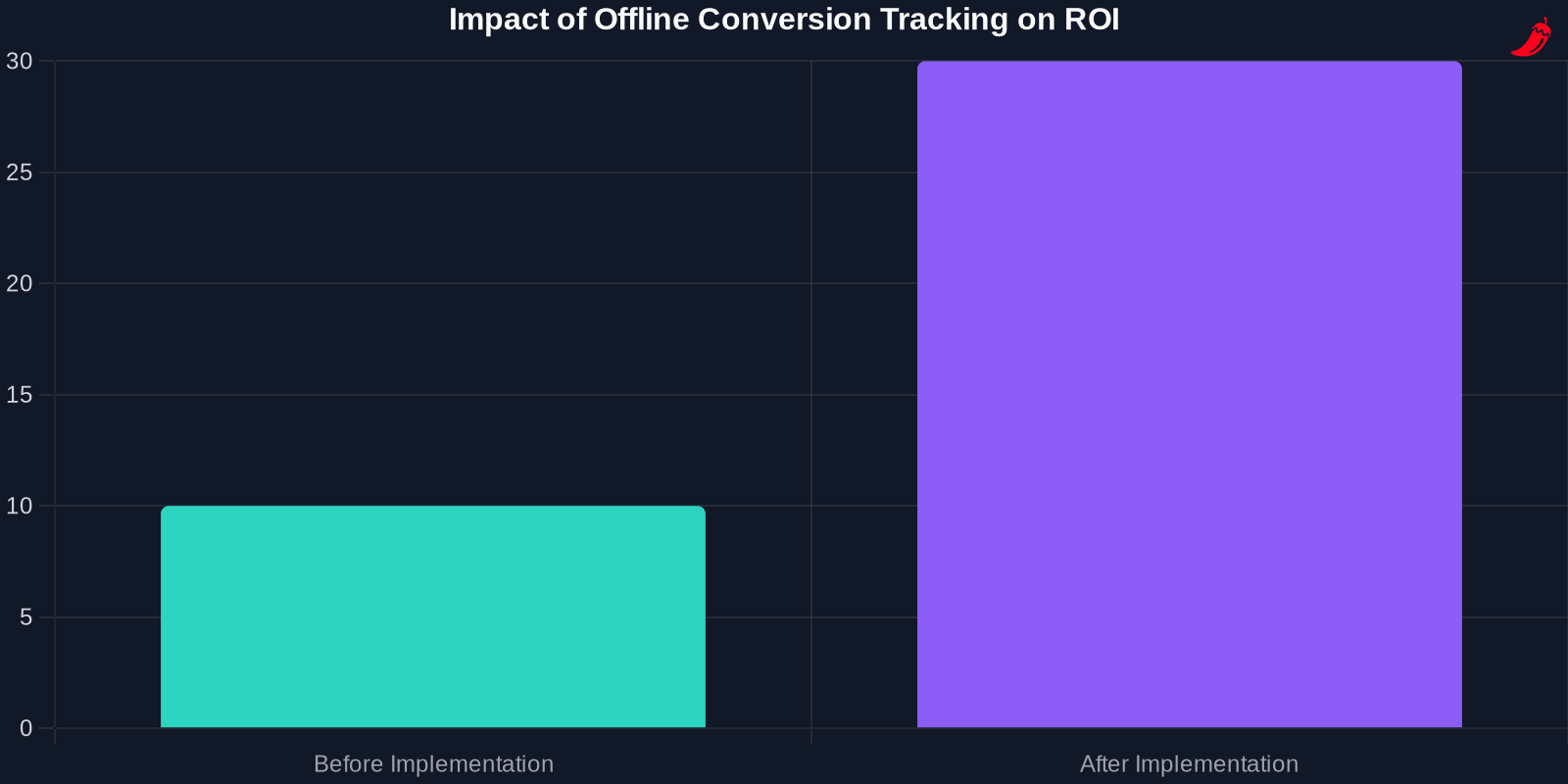
The Impact of Offline Conversion Tracking on ROI
Implementing effective offline conversion tracking can have a significant impact on your return on investment (ROI). By gaining a comprehensive view of the customer journey, you can optimize your ad spend and improve your overall marketing performance.
Measuring ROI with Offline Conversion Data
- Calculate Customer Lifetime Value (CLV): Use offline conversion data to calculate the lifetime value of your customers, providing insights into the long-term impact of your marketing efforts.
- Identify High-Value Channels: Analyze your offline conversion data to identify the channels that drive the most valuable customers and allocate your ad spend accordingly.
- Optimize Campaign Performance: Use the insights gained from offline conversion tracking to optimize your campaign performance and improve your ROI.
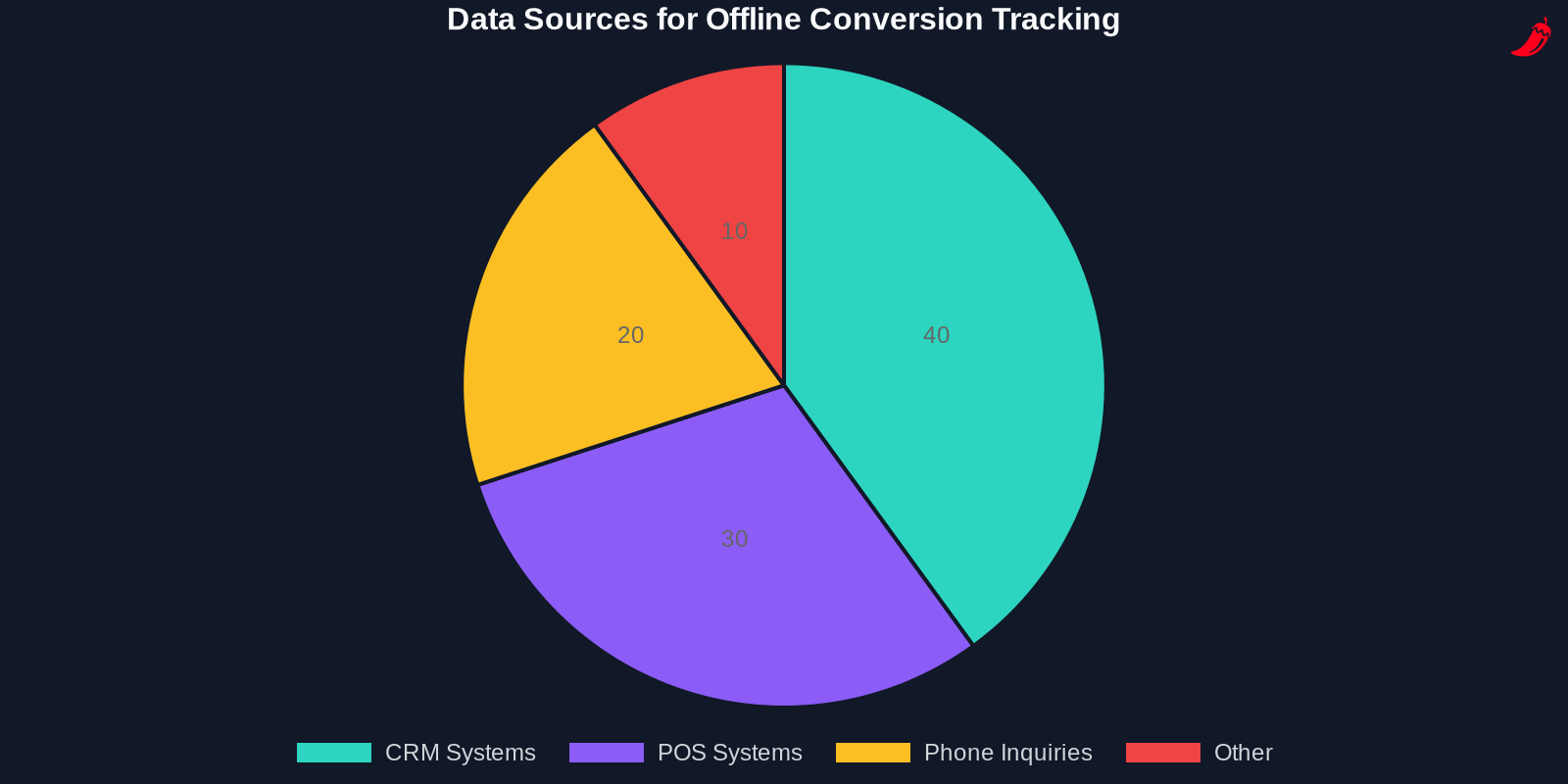
Best Practices for Data Management
Ensure Data Quality
Maintaining high data quality is essential for accurate offline conversion tracking. Regularly clean and validate your data to ensure that it is free of errors and duplicates. This will help you gain reliable insights and make informed decisions.
Implement Data Governance Policies
Establish clear data governance policies to ensure that your data is managed consistently and securely. This includes defining roles and responsibilities, implementing data security measures, and ensuring compliance with relevant regulations.
Use Data Visualization Tools
Leverage data visualization tools to gain a clearer understanding of your offline conversion data. Visualizing your data can help you identify trends and patterns more easily, providing valuable insights for optimizing your marketing strategies.

Conclusion
As the digital marketing landscape continues to evolve, staying ahead of the curve is crucial for success. By leveraging the Data Manager API for offline conversion tracking, you can gain a comprehensive view of your customer journey and optimize your marketing strategies effectively. Prepare for the 2026 changes to Google Ads API and embrace the new tools and technologies to drive better results and improve your ROI.